The nervous question about a game that saves in your browser is the honest one: if you put
twenty hours into a base, what exactly is stopping an update, a cleared cache or a new phone from
taking it? Orbit2D has had four copies of every colony for a while now — the live save, two
rolling local backups, and a server copy behind a Colony Key — plus an export file you keep yourself.
This release finishes the server half of that, because reading the code again turned up a gap big
enough to lose a game through.
The bug worth fixing first
Sync pushed the world you were playing, every ninety seconds, and the server stored it in that
world’s slot. Now imagine installing the app on a new phone, signing in, and tapping Land on a world
you have not downloaded yet. The game generates a fresh colony, autosaves it, and ninety seconds
later that rank-1 save is the server copy of your rank-25 base. The old one is gone,
overwritten by a save that is technically newer.
Two changes close it. The server now keeps the previous copy of every world, so
an overwrite is never final — the copy that got replaced is one tap away on the title screen. And a
push whose progress has collapsed rather than dipped is refused: if the
stored copy is rank 25 and something tries to replace it with rank 1, the server says no and tells
the game why. Normal play is untouched — progress can stall or wobble and still sync; only a
half-or-worse fall against the stored rank or xp trips it, and it is checked on both because some
saves carry no xp at all. If you genuinely do want the new one, saying so out loud is allowed.
Every world, not just the one you are in
The second gap was quieter. Only the live world ever synced, so a world you played before creating
a Colony Key, or one you finished and moved on from, never reached the server at all. Signing in now
uploads every world in the browser that the colony has not seen or holds an older
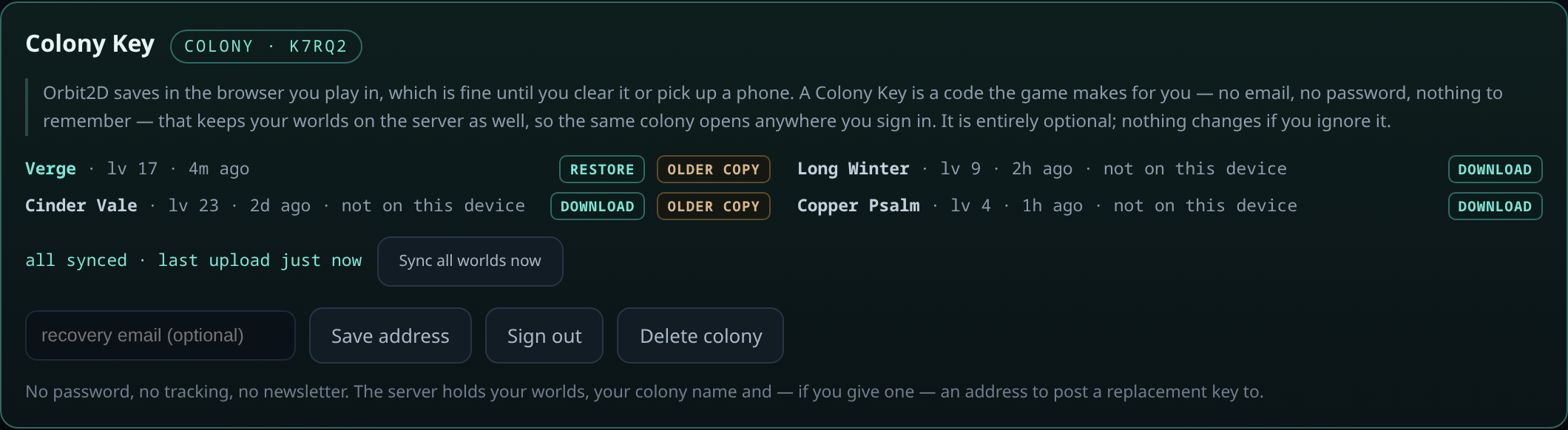
copy of, and there is a Sync all worlds now button for the moment you actually want
an answer to “is my base safe?”.
Saying so out loud
Every synced world is now a row you can act on. Each shows its rank and how long ago it went up;
worlds not on the device you are holding say so plainly and offer Download, and the
ones that are here offer Restore. Where the server is holding the copy a newer one
replaced, there is an Older copy button beside it. Restoring is not a one-way door
either: the save being replaced is rotated into a local backup first, so undoing a restore is just
another restore.
And the status line tells the truth. It reads all synced with the time of the last
upload when that is true, and when it is not it says what is wrong instead — offline, failing, or one
world refused because the colony holds a longer game. A sync indicator that lies is worse than none,
because it is the thing you check before trusting the cloud with a base you care about.
What has not changed
The save in your browser is still the real one. The colony is a copy — a fourth copy — and nothing
on the server can reach into your device and delete a base. The save format is unchanged for the
fourth release running, so the app already on your phone keeps reading everything the web build
writes. Colony Keys are still optional, still no email and no password, and still free.
Seventeen checks cover the server endpoints against the live host and seventeen more cover the
game side, plus a two-browser end-to-end test that creates a real Colony Key, plays a world, signs in
from a clean browser, downloads it, and confirms the fresh install cannot flatten the long game.
Live now at orbit2d.co as v0.14.0 and in the Android build on the
download page.
Leave a Reply